
Updated for 2026: Learn how to change, add or refresh a playlist in IBO Player using your MAC address and device key. These steps work on compatible Smart TVs, Android TV devices, Firestick and mobile devices.
Step 1: Open the IBO Player App
First, open the IBO Player App on your device (Smart TV, Android TV Box, Firestick, or Mobile).

Step 2: Go to App Settings
Once the app is open, navigate to the Settings or Device Info section.
Open Setting
Step 3: Note Down Your MAC Address and Device ID
You will see your MAC Address and Device ID displayed.
(Example of MAC: 00:1A:79:XX:XX:XX)

Save these somewhere — you’ll need them in the next steps.
Step 4: Visit the IBO Player Website
Open a web browser on your phone, tablet, or computer and go to:
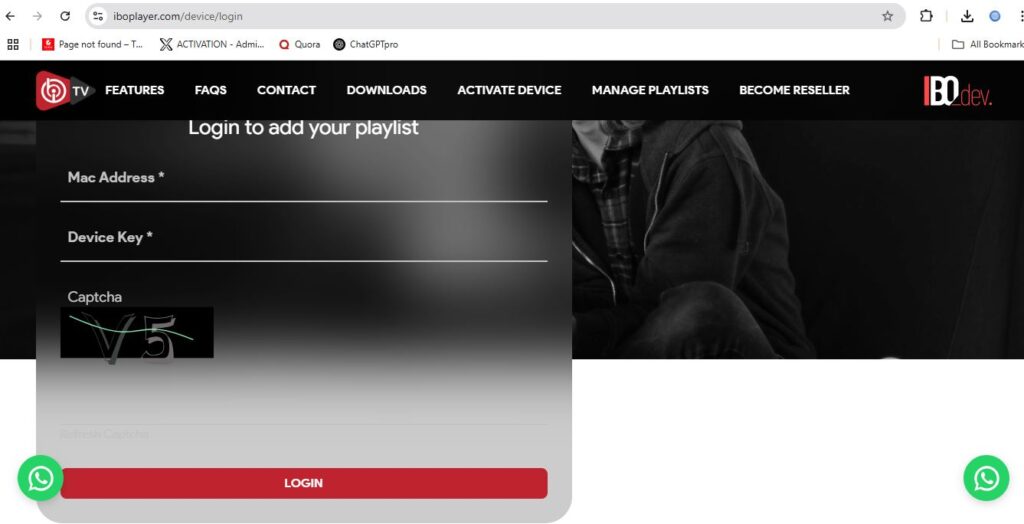
Step 5: Log In Using Your MAC Address and Device ID
Enter your MAC Address and Device ID exactly as shown, then click Login.
Step 6: Delete Old Playlist (If Needed)
If you want to replace an existing playlist, you can first delete it or choose to overwrite it.
Step 7: Upload New Playlist
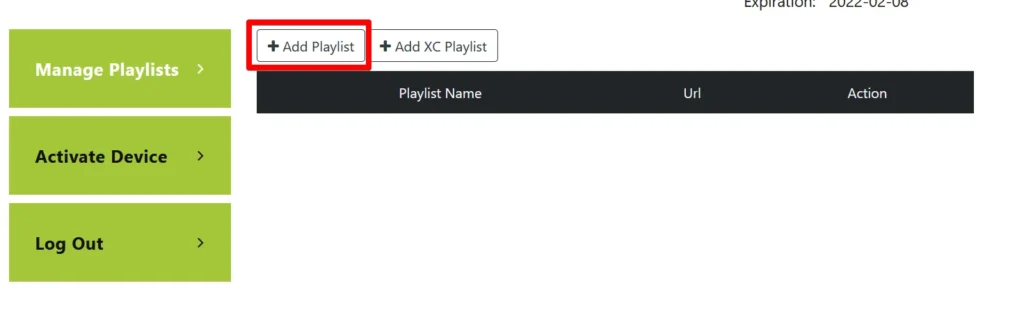
- Click on “Add Playlist” or “Upload Playlist”.
- Enter your M3U Playlist URL (provided by your IPTV provider).
- Give your playlist a name (example: “My Favorite Channels”).
Step 8: Save Changes and Refresh the App
After uploading, click Save.
Then go back to your IBO Player app and Refresh or Restart the app to load the new playlist.
Step 9: Enjoy Your New Channels!
Your new playlist is now ready! Enjoy watching your favorite content.
Important Tips:
- Make sure your M3U URL is correct and active.
- If the playlist doesn’t appear, try clearing app cache or reinstalling the app.
- IBO Player requires a license after the trial period — don’t forget to activate it.
Need Help?
If you face any issue while uploading your playlist, feel free to contact our support team. We’re always ready to assist you!
IBO Player Playlist Not Loading? Try These Fixes
- Check the playlist URL for spaces or typing errors.
- Restart the app and refresh the playlist after saving.
- Confirm that your internet connection is stable.
- Clear the app cache before reinstalling the player.
For connection help, read our IPTV buffering fixes and internet speed guide for HD and 4K.
Frequently Asked Questions
Can I add an M3U playlist to IBO Player?
Yes. Use the player’s official device-management portal and enter the MAC address and device key shown inside the app.
Why is my IBO Player playlist not updating?
Save the playlist in the management portal, then fully restart or refresh the app. Also verify the playlist URL and your network connection.
Does IBO Player provide channels?
No. IBO Player is a media player. Users must add valid details from a service they are authorized to access.
Need setup assistance? View our service options or contact us on WhatsApp. A device compatibility trial may be available.